Authors

Thursday, February 21, 2013

An Easier Way to Connect With Your Customers on Foursquare

In just the past few weeks, Foursquare released it's Foursquare for Business app (if you don't know what Foursquare is, read Jeff's post from 2010).  The app allows business owners to share information with their customers and view analytics right from their smartphone.

This new app seems to be a nice and quick way to connect with your customers across multiple platforms.  From the app, the business owner/manager can create a Foursquare update and also cross-post it to Facebook and Twitter.  

Another useful feature of the Foursquare for Business app is the ability to view check-ins.  In the past, you could only view check-ins from the past 3 hours, but now you can see check-ins from the entire day. You can also easily view who your top customers are.


Also, the app will allow the manager to drive traffic to their store by posting Foursquare specials.  For example, a coffee shop manager could quickly post a picture of a latte with a caption "the next ten customers who check-in on Foursquare will get a free latte with the purchase of a muffin."  


As an ag business owner, have you used Foursquare?  If yes, how have customers responded to your Foursquare presence?  Do you think this new app will allow you to manage your Foursquare presence more effectively?

Friday, February 15, 2013

Exploring Demographic Groups-- Asian-Americans

From 2000 to 2012, the Asian-American population has jumped 51% to 18.2 million people (and is expected to rise another 13% by 2017).  The article "Asian-Americans: Fast Growth, Deep Pockets" reports that Asian-Americans also on average have "higher household incomes (28% above the U.S. median), educational achievement (50% of Asian-Americans 25 and older graduated college vs. 28% of this age group nationwide), and frequent living in nuclear households of 3.1 people vs. the 2.6 U.S. average." 

So what do these figures mean?  Asian-Americans have a large buying power and this demographic group shouldn't be overlooked.  How big?  As reported by Nielson in their "State of the Asian-American Consumer" report, their buying power is $718 billion!

How should you market your products to Asian-Americans?  As always, DO YOUR RESEARCH!  Here are some interesting facts and tips to help you get started:

1.  English is not the predominant language spoken in most Asian-American homes (77% speak a language other than English).  Explore the possibility of advertising in an Asian language.  

2.  70% of Asian-Americans own a smartphone as compared to 55% of all Americans.  Explore social media as an advertising tool.  Also, optimize your website for mobile viewing.


3.  Nielsen reports that Asian-Americans spend more time online (80 hours/month) than any other demographic group.  Make sure your website is eye-catching and easy to use.  Also, try to gain customers through the development of an interesting newsletter.

4.  When grocery shopping, Asian-Americans are less likely to plan their purchases ahead of time as compared to non-Hispanic whites.  In-store atmosphere (including product variety, signage/displays, and promos) is most appealing.  Include a variety of products in your store that appeal to Asian-Americans with signage to steer them to these items.


Take the time to explore different demographic groups and how they shop.  Is your product lineup and/or store appealing to different types of people?  If not, how can you improve your image to different shoppers? Have you tried marketing specifically to one type of demographic group?  If so, what did you do and how did your marketing campaign pay off?

Tuesday, February 5, 2013

Selling Valentine's Day Items--Who is Buying and How Much are They Spending?

Good news for retailers selling Valentine's gifts-- sales are expected to increase this year over last (as per a Valentine's spending survey conducted by BIGinsight), but unfortunately not by much.  Last year's spending averaged $126.03 per person while this year's projection is to only be $130.97, which is about $18.6 billion in the USA for consumers 18 years and up.

This modest increase can make us assume that consumers are being cautious with their spending this Valentine's Day.  What does that mean for ag retailers?  Consumers will probably be more price conscious when picking out their gifts whether it's flowers, candies, dinner, etc.  To lure customers in, you may want to explore special sales or deals.  If you don't want to discount your current selection, you could try offering a special package that is lower in price than your normal selection without lowering your profit margins.  For example, a chocolatier with an average total production cost of $0.50/ piece of chocolate may offer a 24 piece box of chocolates for $50 as their cheapest item.  This may be out of the price range for many consumers, but the chocolatier could gain some customers by offering a 6 piece box for $15 (and would still be making a similar profit per piece).

Since price and value will be important to consumers this year, you can expect comparison shopping to be very important.  In the BIGinsight survey, 39.3% of respondents will be shopping at discount stores, 33.2% at department stores, 26.3% will be buying gifts via online shopping, 22.9% at specialty stores, 19.6% at floral shops, 11.2% at jewelry stores, 7.5% at specialty clothing stores, and 2.6% via catalogs.

While the most money is not surprising going to be spent on a significant other ($73.75), other loved ones will be getting gifts too.  Twenty percent of Americans are projected to buy Valentine's gifts for their pets, with a total spending projection of $815 million!  Even if you aren't selling pet products currently, you might want to explore this market.  A bakery selling human goodies could add some special Valentine dog treats to their menu or a wool shop could offer heart-covered doggy sweaters.  Be creative!

The key take-away from this post is that even though consumers are being price and value conscious, it doesn't mean they aren't spending this Valentine's Day!  Explore the possibility of adding lower cost items (like the smaller chocolate box mentioned above) without sacrificing your profit margins.

Read more about Valentine's spending at nrf.com (National Retail Federation).

As an ag entrepreneur, how do you prepare for Valentine's Day?  Do you offer special promotions?  What items beyond chocolates and flowers are customers looking for?

Monday, January 28, 2013

Instagram and Small Businesses

Using photos in your social media efforts can provide amazing results. Recently, I heard Julie Flinchbaugh (@flinchsorchard) talk about her most successful Facebook posts (as measured by Facebook Insights) of 2012.  The top ones all had an image.  Photos capture a moment unlike words ever could (unless you use 1,000 words, or so says the proverb).  Is there any wonder why, then, two of the hottest social media tools are Pinterest and Instagram?  We've discussed Pinterest in this blog a few times.  (Check out Lots of Interest in Pinterest... and Pinterest Secret Boards - Make Use of Them for Your Business. That first one needs a bit of an update...)  Let's briefly talk about Instagram, though.

My Instagram page as viewed on a web browser. Your business's pics in this format could be very engaging!
Instagram is a photo-based social media tool designed primarily for mobile phones and tablets.  (The website is a relatively new feature.)  It allows the user to snap a new pic (or use one stored on the device), edit it (notice the various effects in the pics above) and add a caption.  The user can also share the photo to Facebook, Twitter, Tumblr, and foursquare.  Users of Twitter and Facebook will also recognize the usefulness and power of @ mentions of other users as well as hashtags.  These act just like they do in the other tools.  Finally, all content is public by default.  Users follow each other similar to the Twitter model and, like Twitter, you can make your profile private.

I made this Granny Smith
tower. What if I had linked it
to my favorite orchard or grocery
store?  What if I had tagged a friend
to tell them how good the apples were?
According to its website, Instagram currently has over 30 million user accounts and over 5 million photos are uploaded each day.  Individual use of the tool continues to grow.  Here are 6 ideas how you might use it to connect with your customers and tell your business's story....

  1. Post pics of cool stuff around your business; how you make your product, the view from your farm market, a customer enjoying your product.  Be sure to add appropriate hashtags to expand your reach.  Add a comment asking for people's thoughts or challenge them to identify what they see.
  2. Add a personal touch if customer relationships are important. Pics from a family vacation, holidays, or weird things you see on any given day are all good stuff.  Show them whatever you are comfortable sharing.
  3. Tie Instagram to your other social media accounts.  This will help you spread your word and hopefully attract people to connect with you in multiple ways.
  4. Encourage users to post pics of themselves using your products.  Ask them to @ mention you.  You might even create a hashtag to group all those pics.  (This could be a photo contest opportunity if you can decide how to judge them. Random drawing, perhaps?)
  5. If you have a retail location, encourage users to post photos and tie them to foursquare check-ins.  This builds your presence on foursquare and adds that powerful image to what might otherwise simply be a check-in notification.
  6. As with other tools, be social with it.  Like things that those you follow post (if you really do like it).  Comment on it.  Respond to comments on your pics. Etc.
I've grown to enjoy Instagram for its simplicity and ability to engage another user (including a business) around a photo.  With just a bit of thought, I think there's a lot of potential to use it effectively in marketing a small business, especially food and agricultural businesses.  If you follow me (jeffhyde), I'll absolutely follow you back!

Thursday, January 24, 2013

Finding and Keeping Your CSA Members

by Brian Moyer, Penn State Extension Program Assistant

Think about who your ideal CSA member is. Find them and keep them.
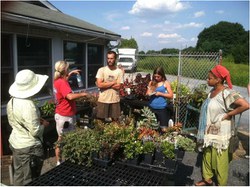
One of the attractions of having a CSA (Community Supported Agriculture) farm is it allows you to focus more on farming and spend less time on trying to figure out where you are going to market your harvest. While there may be some truth in that, one still needs to find the "community" portion of the CSA that will support your farming venture so let's look at some ways to find shareholders or members and explore some methods you can use to keep them.

According to a survey of shareholders of CSA's in the Mid-Atlantic Region that was compiled by Lydia Oberholtzer for the Small Farm Success Project, on average, CSAs have to replace 55% of their shareholders every year.  This can be a lot of work and worry every winter when you'd probably rather spend your time planning and ordering seeds for your upcoming season.

Who Are Your Shareholders?
Spend some time learning about the members of the community you want to grow food for. What are their staple foods? What do the demographics look like?

Knowing who is in your community might influence the products you will offer, drop off points, what kind of shares you are offering, events you may have, and how you communicate with your shareholders.

Finding Shareholders
No matter what form of agriculture you do, you will have to be involved in some form of marketing, and CSAs are no exception. The dictionary definition of marketing is: The total of activities involved in the transfer of goods from the producer or seller to the consumer or buyer, including advertising, shipping, storing, and selling.

Marketing requires three things: time, tools, and a bit of knowledge. Time for marketing is not the first thing we think about as farmers, but maybe it should be. Think of it this way, the harvest isn't fully complete until the food is in the customers' hands.

There are many marketing tools available to us today that can make reaching out to your customers or shareholders so much easier. The trick is selecting the tools that are right for you.  There are the obvious ones: logo, business cards, and invoices. These are very important. They give your business a "look" or "feel" and something that your customers will recognize immediately.  Once you have those basics, how are you going to use them?

How do your potential shareholders get their information? Do they search websites? Do they use Facebook? Do they have a newspaper subscription? Knowing the demographic you are trying to reach will help you select the marketing tools that will work best for you.

Nationally, the demographics of CSA shareholders are suburban or urban, they are educated, mostly female, between the ages of 30 and 49, and are already consumers of organic foods. They want high-quality food and they want to support local farms.

If this is the demographic of your community, then such internet tools like websites and social media might be one of your options.  Ah, but not all social media is created equal. There are demographics for different networks.  For instance, if a majority of your shareholders are women, the social network site Pinterest may be one you will want to look into since a majority of its users are women. Social media can be a good tool for instant and brief communication with your shareholders.

Whatever you decide to use, all your tools should direct people to your website. Think of your website as the hub and your other tools, such as Facebook, Pinterest, blogs, e-newsletters, etc., as spokes. The website is where all the important information should be.

A website should include three main things and they are what farmer Lisa Kerschner of North Star Orchards calls background info, basic info, and bummer issues.  Background information would include letting folks know why they should invest in you.  Are you an experienced farmer or are you just starting out? Why should they become shareholders in your farm? Be sure to include any testimonials from existing customers if you have them.

Basic information would cover things like how much is a share? Where do I pick up my share? What does a share include? What are my responsibilities as a shareholder? Also let folks know if you are partnering with any other farms to provide products for the shareholders.  Bummer issues would discuss: what if I can't pick up my share this week? What happens if there is a crop loss?

Keeping Shareholders
Just as you need methods to communicate with your shareholders, you should provide ways for the shareholders to communicate with you.  You need to know why they join, stay, and leave. How do they use the produce you provide? Is it enough? Is it the quality they expected?

Some tools you can use:
  • Create a "core group" of shareholders for advice, feedback, and planning
  • Create opportunities for feedback (during the season and at the end of the season)
    • Talk to members at pick-up
    • Have a "comment tree" (paper, web, email)
    • Have an email listserv for the shareholders
    • Conduct surveys (email, web, paper) at the end of the season
  • Learn why members don't renew
The biggest reward for taking the time to use these tools effectively is having clear and better communication with your shareholders.  This will results in better retention rates and spending less time in the winter trying to find new shareholders and more time doing other things.

For more information on marketing, check out our website and Pinterest site.

Tuesday, January 22, 2013

LinkedIn, Part IV: Company pages

Not only can LinkedIn users create a personal page, users can create business pages.  Just as with Facebook and other social media sites, LinkedIn will lead you through the process of building a business page so that you can connect with other users, ask them to provide recommendations, and promote goods and services.  A few things you will be asked to do when creating the company page:

1.  You’ll be asked to provide details about the business (company name, type of company and size, URL, industry, etc.).


2.  Indicate who will be able to post of the page – you have the option to limit posting to the person who creates the company page or allow other company employees to act as administrators, and, provide a contact email address.  (Image from LinkedIn's company page builder example)


One thing to be aware of when registering your company page – domain names with @comcast.net, @gmail.com, or similar are not considered valid. 


As with other web tools you use, LinkedIn will also provide analytics pertaining to the number of page views and unique visitors who view your company page, as well as the visitor’s demographics.  In addition, LinkedIn will compare these numbers to numbers for what they call “similar companies.”  So, if there are a fair number of “like” companies who have LinkedIn company pages you may see some valuable data; however, if there are few other businesses with company pages in your category – the available comparison statistics may not be of much use. (Image from LinkedIn's company page builder example)


To build a company page, click the “Companies” tab, select “Search for Companies,” and then click “Add a Company” link, which you will find on the right hand of the screen.  Right now you might find too many ag. businesses listed but why not be one of the first and create your page.  For some inspiration view LinkedIn’s slideshow of “The 12 Best Linked company Pages of 2012” at tinyurl.com/c2t4gr9. 

Take the time to not only update our profile often but to look through the LinkedIn “Help Center” feature as the tool is likely to continue to evolve.  You are bound to find a feature that you fell will benefit you or your business, such as recruiting for your business (for which a fee is charged), or learn about positions that you might be interested in.  Take some time and navigate through the system to become familiar with LinkedIn and make valuable connections. 

Thursday, January 17, 2013

LinkedIn, Part III: Networking and groups

It is quite possible that even those who do not own a LinkedIn account know that the primary purpose is to build and enhance networks.  LinkedIn has a few tools that I have found useful to share with other LinkedIn users and to learn from others in my industry.

Tweet to your links

I am an active Twitter user and have connected my Twitter and LinkedIn accounts such that what I post on LinkedIn can also post to Twitter (I have also done this in a social media dashboard that I use, HootSuite, where I can select the tweet to post to Twitter and LinkedIn).  This is not mandatory; I do have the option of just strictly posting the content on just LinkedIn.  But, think about your audiences who follow/link to you on different social networks you might be involved with – might some of your postings apply to more than one audience?  If so, why save time and post to more than one network by clicking just one “share” button?

How to set up the ability to post to LinkedIn and Twitter simultaneously. 


Why have I chosen to do this?  The more often that my posts appear on any friends’, followers’, or linkages’ feed - the more often they (may) see my posts, topics I like to discuss or contribute to, and may be more likely to read these posts, access my other social media profiles, and view me as more of a resources who shares information that is of value to them. 

Provide and ask those you’re linked to for recommendations

Aside from sharing content on LinkedIn, I have also been asked, and obliged, to provide recommendations for some of my connections.  A recommendation is merely a shot description of the person’s skills, experiences you've had based on interacting with them, and similar.  Consider other businesses that you have relationships with.  If you were to endorse them on LinkedIn – could you help build their reputation and credibility as a leader in their industry? Certainly, you would not want to provide recommendations for each and every LinkedIn user you are connected to, so be selective and provide honest insight as your name, as well as reputation, is tied with you include in the recommendation.

An example of a recommendation I wrote for a guest lecturer who has spoken in one of the classes I teach at Penn State. 

It is not necessary to wait for someone to ask you for a recommendation in order for you to write one, rather anytime you click on one of your connection’s profile you are presented with the option: “would you like to recommend (name)?”  Pretty simple and straightforward just like your ability to add/select keywords that describe your connection’s skills or expertise. 

Join or start a LinkedIn group

The ability to join a LinkedIn group, based on an interest or industry, is one of the strengths of this social network.  Some specifics about groups:

·       You do not need to join most groups to view what members are posting, unless it is a closed group and an administrator must approve your membership before you can participate, but if you want to receive updates with about the group’s activities (posted on your feed page) you do need to join. 

·       You can join up to 50 groups and browse discussions, learn about promotions group members are offering (e.g. classes, special discounts on merchandise), job postings, and see a listing of group members. 
Groups can be very useful resources.  Members post questions and other members can respond or “like” comments.  My own experience with joining a group evolved from connecting with key group members to asking group members to suggest topics for a course I teach.  This informal exchange resulted in some interesting and diverse comments and viewpoints.  Even if you never initiate a discussion, it is interesting to learn from others about how they solved a problem similar to what you are experiencing or learn about potential opportunities. 

This is the message I wrote and that was posted on my group's page.  Other group members provide thought provoking and valuable replies. 

LinkedIn provides a few tools that can help you identify groups you may want join. You can:

  • do a general search for a group based on keywords (as I write this blog there are 1.5 million groups) 
  •  filter the entire list of groups by language and/or by instructing LinkedIn to only select groups that your connections belong to – doing this narrowed my results to 880. 
If you do not find a group that you want to join you can always create your own.  The process is very straightforward and you have the option of having an open or closed group.  Additionally, you can alert others about your group by using the “invite others” option in each group’s page.  By clicking on this link an email is generated with a brief description of the group’s purpose that you can send to others who might be interested in joining. 

In the last of this series of blog postings on LinkedIn I'll describe company pages and how easy it is for businesses to build their own.